
Comparison
Best AI Tattoo Generators (2026): 5 Tools, Free Tiers and Prices Compared
There is no single best AI tattoo generator. The right one depends on what you need to do next. BlackInk fits detailed generation controls plus a built-in stencil converter. INK fits turning a photo into a tattoo, with try-on and a free daily allowance. TattoosAI keeps prompt-and-style generation simple. Adobe Firefly is a general-purpose tool with free daily generations. CustomTattoo AI puts a generator, a visualizer, a name tool and a stencil studio in one account. We make CustomTattoo AI, so read this as a vendor's comparison: every fact below comes from each tool's official pages, checked November 6, 2026.
How we compared these AI tattoo generators (and what we did not test)
We opened each tool's official pricing, FAQ and feature pages on November 6, 2026. For each one we recorded what it states about the free tier, sign-up, privacy, photo input, body preview, stencil output, license and price. We did not create accounts on the other tools, did not pay for any plan, and did not run the same prompt through every generator. So nothing on this page ranks image quality. A fair quality test needs the same brief, the same number of attempts and the raw outputs published, and we have not done that yet.
Two more rules. When a vendor contradicts itself, we show both numbers instead of picking one. And we left out tools whose tattoo pages we could not open on the day of the check. Perchance, which often appears in these lists, blocked our request, so we have nothing verified to say about it.
What do you get for free from each AI tattoo generator?
| Tool | Free to start | Account | Free designs private? | Photo input | Body preview | Stencil | Paid price |
|---|---|---|---|---|---|---|---|
| BlackInk source | 3 free designs (1 without an account) | Not stated | Yes: private / public toggle per design | Only through Image-to-Stencil | Body-placement previews, sleeves (Pro) | Stencil converter (Pro) | $15/mo, $39.99/3 mo, $72/yr (USD) source |
| INK source | 3 designs a day, no card; free exports watermarked | Not needed to start | Yes: private history; feed only if you post | Yes: photo to tattoo, cover-up designer | Try-on in the apps (Pro) | Sketcher linework, not called a stencil | Web: $14.99/mo, $39.99/yr, $179 lifetime; app prices vary by country |
| TattoosAI source | 4 designs per account, no card | Yes | No: basic-plan designs go to the public gallery | Not stated | No ("in development") | Free stencil maker, no account | $14.99/mo, or $4.99/mo billed annually source |
| Adobe Firefly source | Free daily generations (count not stated) | Adobe account | Not stated | Yes: reference image (sketch or photo) | Not offered on the tattoo page | Not offered on the tattoo page | From US$9.99/mo for 2,000 credits source |
| CustomTattoo AI (ours) source | 3 free credits (1 credit = 1 generation) | Yes, for the free credits | Yes: private library source | Yes: Image to tattoo (account) | Visualizer: your design on your own photo | Stencil studio (account) | One-time packs: €4.99 for 15, €9.99 for 40, €19.99 for 100 credits; no subscription |
Prices are in the currency each vendor shows: US dollars for the four other tools, euros for CustomTattoo AI, so the rows are not directly comparable without a conversion. "Not stated" means the official pages we checked do not say. Two vendors contradict themselves: INK's FAQ says it supports 40 tattoo styles while its pricing card says "20+", and TattoosAI's homepage FAQ quotes $4.99 a month, which is the annual plan's monthly rate. Pay monthly and it is $14.99.
Best AI tattoo generator for a full tattoo workflow: CustomTattoo AI
The AI tattoo generator starts from a text idea, then lets you pick one of eight styles (fine line, blackwork, realism, traditional, Japanese, geometric, minimalist, neo-traditional), the ink (black and grey, black only, or color) and a detail level. The free tattoo visualizer covers placement: you upload a design and a photo of your skin, then move, resize, rotate and fade the design to judge placement. The name tattoo generator handles names and lettering. In the studio, the stencil tool turns a design into stencil linework (1 credit), lets you fix it with brush, eraser, crop and text tools, compares it with the source, and prints it at a width you set in centimeters or downloads it as a PNG.
Pricing is pay-as-you-go: 3 free credits, then one-time packs in euros, and credits never expire. The limits: turning a photo into a design (Image to tattoo) needs an account, as do the free credits, placement is checked in the visualizer rather than with body templates inside the generator, and there is no temporary-tattoo printing. Our terms also say plainly that we cannot guarantee a design is unique.
Best AI tattoo generator for detailed controls and stencils: BlackInk
BlackInk's Pro plan lists line weight, complexity and color controls, body-placement previews with sleeves and custom shapes, a stencil converter and high-resolution downloads. It returns four images per idea and lists 19 styles. Its FAQ says text tattoos are supported, that you can upload your own image only through the Image-to-Stencil feature, and that downloads come at 2048 × 2048 px (high-res) or 512 × 512 px (low-res and printout). Each design can be set to private or public.
BlackInk also prints any design as a temporary tattoo that it says lasts one to two weeks, printed and shipped from the US. After three free designs (one without an account, two after sign-up) it is a subscription: $14.99 a month, $39.99 for three months or $72 a year, in USD (re-checked November 11, 2026). Choose it if you want fine control over the drawing itself and a stencil inside the same tool.
Best AI tattoo generator from a photo: INK
INK is the one to try if your starting point is an image. Its Photo to Tattoo feature takes an uploaded picture and turns it into a tattoo design. The Cover-Up Designer starts from a photo of existing ink and builds a design over it. Sketcher produces linework in Pencil, Ink, Charcoal or Clean Linework styles. That is the closest INK gets to stencil-ready art, although it does not call it a stencil.
It is also the only one of the five that lets you start without an account: 3 designs a day, no card, with a small watermark on free exports. Pro removes the watermark and adds unlimited generations, high-resolution exports and the in-app try-on. On the web Pro costs $14.99 a month, $39.99 a year or $179 once. In the iOS and Android apps, Apple and Google set the price per country.
Simple prompt-and-style generation: TattoosAI
TattoosAI keeps it simple: write an idea, choose among more than 18 styles, generate. Every account gets four designs with no card. The privacy trade-off matters: on the basic plan your designs are added to its public exploration gallery, and keeping them private needs the pro plan. There is no try-on yet (TattoosAI says one is in development). Its free side tools, including a stencil maker, work without an account. Paid access is $14.99 a month, or $4.99 a month billed annually, with unlimited designs and permanent cloud storage.
General-purpose option: Adobe Firefly
Adobe has a tattoo generator page for Firefly, but the tool behind it is a general image generator. You type a prompt of up to 750 characters or upload a reference sketch or photo, then download the result. It needs an Adobe account and gives free daily generations without saying how many. Adobe itself warns that AI designs may need adjusting for your skin tone or body type and suggests working with a professional artist on the final piece. Paid Firefly plans run from US$9.99 a month (2,000 credits) to US$199.99 (50,000 credits). Pick it if you already use Adobe tools and don't need stencils or a body preview.
Is there a free AI tattoo generator with no sign-up?
Of the five tools, only INK says you can start without an account: 3 designs a day, with a watermark on free exports. The others need an account for their free allowance. BlackInk gives four designs and TattoosAI four per account, which land in its public gallery on the basic plan. Firefly needs an Adobe account, and CustomTattoo AI gives 3 credits once you sign up. "Free" here means a trial allowance, not unlimited use. Check what happens to watermarks, resolution and privacy before you rely on a free design.
Which AI tattoo generator shows the tattoo on your body?
- BlackInk: body-placement previews, including sleeves, on the Pro plan.
- INK: try-on inside the iOS and Android apps, on Pro.
- CustomTattoo AI: the tattoo visualizer places your design on your own photo, with size, rotation and opacity controls.
- TattoosAI: not yet; the company says try-on is in development.
- Adobe Firefly: no body preview on its tattoo page.
A preview tells you about size and placement, not about how the lines will look after the skin heals. See tattoo healing stages for what changes in the first weeks, and the visualizer guide for taking a photo that gives a useful preview.
Can ChatGPT design a tattoo?
Yes, as a general image tool: you can describe a design or upload a reference and ask for variations. What it lacks is the tattoo-specific step: no stencil conversion, no print-to-size, no body-placement preview. OpenAI's own image generation guide lists the limits of its GPT Image models. Text can still come out with imprecise placement and clarity. Precise layouts are hard to control. And a design can drift between generations. For a name or a date, the first limit is the one to watch.
People also search for a "ChatGPT tattoo stencil prompt". Asking for black linework on a white background with no shading gets you art that looks like a stencil, but it is still an image. Your artist sizes it, cleans it and makes the real stencil for your skin. The stencil guide explains that step.
Are AI tattoo generators good? What they still get wrong
They are good at one thing: showing many directions for an idea in a few minutes. They are less reliable on the details that decide whether a design can be tattooed. Here is one AI-generated fine line design with a name, made for this article, with the five things we would check before showing it to an artist.
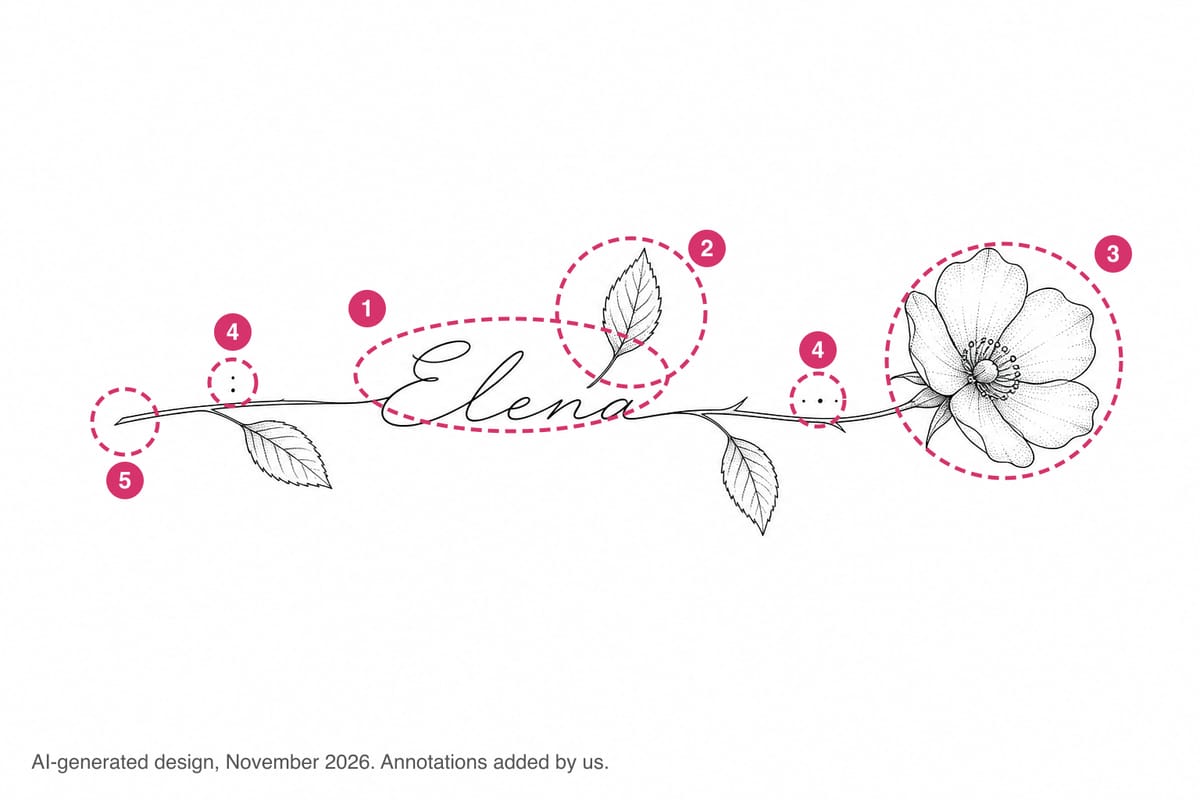
- Spelling and letter spacing. "Elena" is spelled right here, but check every letter and the gaps between them. AI text can swap or merge letters, and hairline joins can disappear on skin.
- Line continuity. The top leaf floats: its stem never meets the main stem. Follow every line to where it should connect.
- Fine detail. The petals are shaded with tiny stipple dots. They read well on screen and are much harder to keep crisp at a small size.
- Stray marks. The dots left and right of the name have no purpose. Every mark on the drawing becomes a mark on your skin.
- Line ends. The stem just stops on the left. Decide whether it should taper, curl or end in a leaf.
Symmetry does not apply to this design, but it matters for mandalas, wings and faces. BlackInk's own FAQ warns that results sometimes have weird shapes or bad symmetry and tells users to have their artist review and clean up the design.
Detail that works on screen can disappear at real size
On a phone, every design is shown at the same size. On skin it is not. Below, the same AI design is placed to scale on a forearm 9.5 inches from elbow crease to wrist crease. That is the median for women in ANSUR II, the US Army body measurement survey of 1,986 women and 4,082 men (10.5 inches for men; one side of the forearm is about 5.2 and 6.1 inches across). By our measurement, the capital E is about 4 mm tall at 2 inches wide, 7.5 mm at 4 inches and 11 mm at 6 inches.
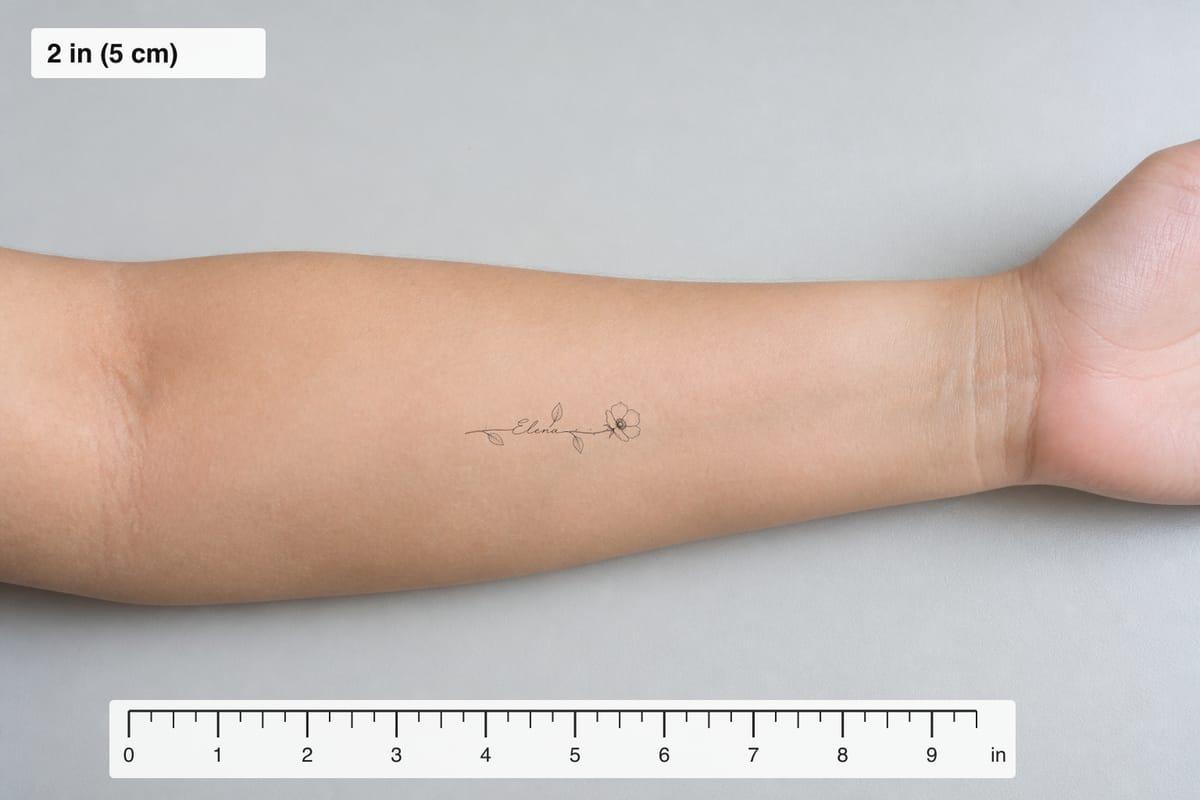 2 in (5 cm)The name is about 4 mm tall and the stipple shading merges into grey.
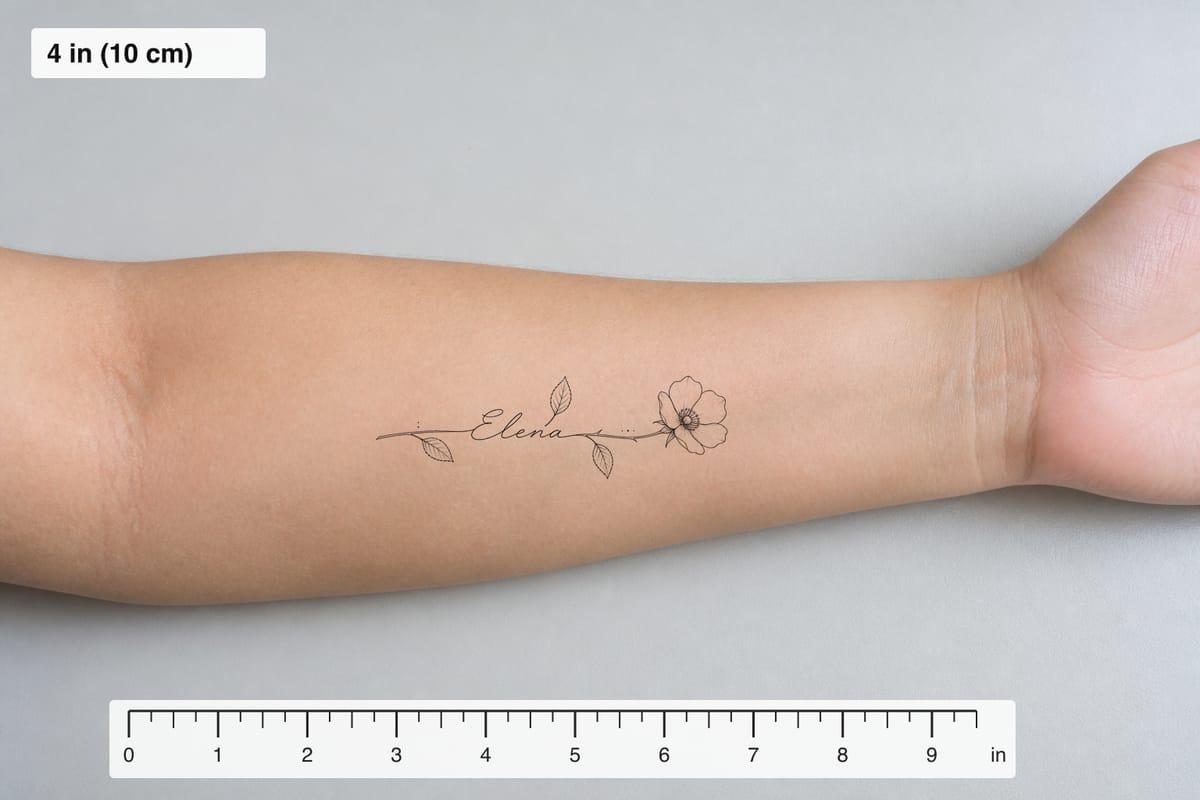 4 in (10 cm)The name becomes readable, but the stipple dots still sit very close together.
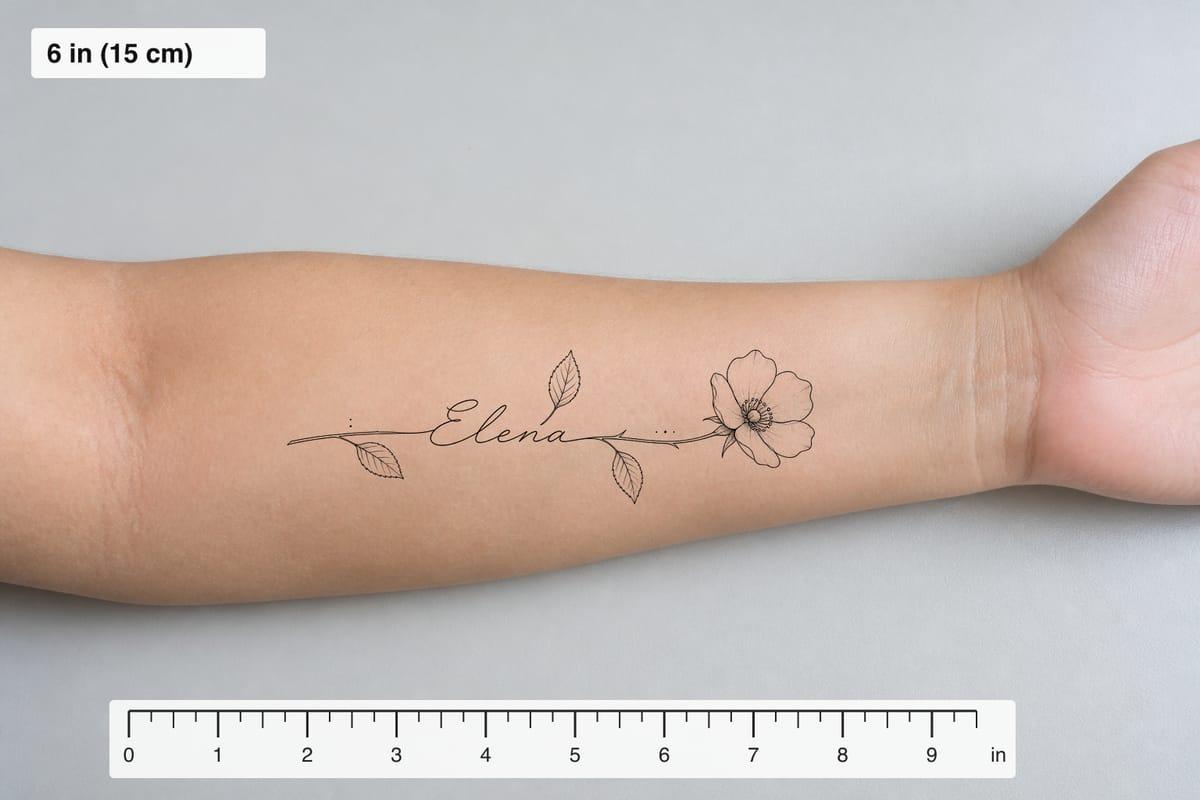 6 in (15 cm)Close to two thirds of the forearm's length, with room for the detail to breathe.
The tattoo size guide gives the same measurements for other body parts, and the forearm placement guide covers how the area moves and ages.
Who owns an AI-generated tattoo design?
In the US, the Copyright Office's Part 2 report on generative AI, published January 29, 2025, says prompts alone do not make an output protectable. Protection can apply where human-authored expression is perceptible in the output, or where a person creatively arranges or modifies it, and using AI as an assistant does not by itself rule copyright out. Separately, each tool sets its own terms for what you may do with its designs:
| Tool | What its terms say |
|---|---|
| BlackInk | Personal use to get tattooed. Artists may tattoo the designs; resale and redistribution, such as flash books or stickers, is not permitted. source |
| INK | "All tattoo designs generated with INK are yours to use." source |
| TattoosAI | No ownership statement on the pages we checked. source |
| Adobe Firefly | Adobe says Firefly models are "commercially safe". source |
| CustomTattoo AI | You own the designs for your personal tattoo purposes; we claim no ownership, and we cannot guarantee a design is unique. source |
What happens to the photos and designs you upload?
- TattoosAI: on the basic plan, your designs go into the public exploration gallery. Private designs need the pro plan.
- BlackInk: you choose private or public per design, and its pricing page says your designs stay private after you cancel.
- INK: says uploaded photos are used only to generate the design you asked for, results go to a private history you can delete, and only designs you post appear in its community feed.
- CustomTattoo AI: uploads and designs are stored in a private library, are not used to train models, and can be deleted at any time; deleting your account removes your library and stored images (privacy policy).
- Adobe Firefly: its tattoo page does not cover this; check Adobe's general terms before uploading a body photo.
A body photo is personal data. Before uploading one, check where it is stored, whether the result is public by default, and how to delete it.
How to test an AI tattoo generator yourself in 15 minutes
- Write one brief with three fixed constraints: a style, a placement and a size in inches or cm.
- Run the same brief in each tool you are comparing and save the first unedited result.
- Count how many attempts it takes to get something you would show an artist.
- If the design contains text, check every letter and the spacing.
- Print it at the real size, or place it to scale with a visualizer, and look at it from arm's length.
- Before paying, write down the export size, the watermark, the renewal terms and whether your designs are public.
| Decision | What to verify | Warning sign |
|---|---|---|
| Design quality | Same brief, same number of attempts in each tool | You only judged the curated gallery |
| Tattooability | Spacing, silhouette, line continuity at real size | Detail that only works zoomed in |
| Lettering | Every letter and the gaps between them | Merged or invented letters |
| Workflow | Try-on, stencil, save and export you actually used | The feature exists only in marketing copy |
| Cost | Free allowance, watermark, renewal, export size | A price shown without its billing period or currency |
| Privacy | Whether uploads or designs become public | No clear storage or deletion terms |
How do you bring an AI tattoo design to your artist?
Bring it as a reference, not as a finished drawing. Send the image with the width and height you want, the exact body area and what you like about it. The artist redraws it for skin, adjusts line weight and spacing to the size, and makes the stencil. Ask up front whether they are happy to work from an AI reference, and expect it to be priced as custom work. The first tattoo guide covers the booking steps, and how much a tattoo costs explains how artists price custom designs.
Related guides
AI Tattoo Generator Guide
Write a tattoo brief that gets usable variations.
Tattoo Visualizer Guide
Check placement and scale on your own photo.
Tattoo Stencil Guide
What happens between the chosen design and the skin.
Tattoo Size Guide
How much room each body part has, in inches and cm.
Tattoo Styles Explained
The same rose in eight styles, before you pick one in a generator.
Sources
- BlackInk AI: Pricing · checked November 6, 2026
- BlackInk AI: FAQ · checked November 6, 2026
- INK AI Tattoo Generator: homepage, pricing and FAQ · checked November 6, 2026
- TattoosAI: Pricing · checked November 6, 2026
- TattoosAI: Homepage and FAQ · checked November 6, 2026
- Adobe Firefly: AI tattoo generator · checked November 6, 2026
- Adobe Firefly: Plans · checked November 6, 2026
- OpenAI: Image generation guide (Limitations) · checked November 6, 2026
- U.S. Copyright Office: Copyright and Artificial Intelligence · checked November 6, 2026
- U.S. Copyright Office NewsNet 1060: Part 2 report (January 29, 2025) · checked November 6, 2026
- ANSUR II anthropometric data (Penn State OpenLab) · checked November 6, 2026
- CustomTattoo AI: Pricing · checked November 6, 2026
- CustomTattoo AI: Privacy policy · checked November 6, 2026
- CustomTattoo AI: Terms · checked November 6, 2026
FAQ
Can AI replace a tattoo artist?+
No. An AI generator is useful for exploring ideas and showing an artist what you mean. The artist still redraws the design for your skin, sets line weight and spacing for the size, makes the stencil and decides how it will sit on the body.
How do I cancel an AI tattoo generator subscription?+
It depends on who bills you. BlackInk says to go to Settings, then Billing, and cancel from the Stripe dashboard. INK's app plans are billed through the App Store or Google Play, so they are managed in your store account. CustomTattoo AI has no subscription: credit packs are one-time payments and credits never expire.
Is a 2048 px download enough to print a stencil?+
At 300 pixels per inch, a common print resolution, 2048 px prints at about 6.8 inches; at 150 ppi it stretches to about 13.6 inches with softer edges. A 512 px file only covers about 1.7 inches at 300 ppi. Your artist will usually redraw the design anyway, so the file mostly needs to be clear enough to trace.
Did CustomTattoo AI run the same prompt in every tool?+
No. This page compares what each vendor states on its official pages, checked November 6, 2026. A quality ranking would need the same brief run in every tool with the raw outputs published, which we have not done.
Tattoo planning tool
Generate, preview and prepare your tattoo in one studio
Describe your idea, generate it in any style, and preview it on your own skin before the needle.
Generate for freeFree to start